Accounting Software for Philippine Service Businesses
Record proposals, invoices, bills and payments once. Keep your general ledger, financial reports and Philippine tax summaries connected as your business works.
Invoice INV-0142
Invoice and ledgerFrom busywork to business as usual
What changes the week you move accounting into Godo.
Accounting, screen by screen
Real screens from the product, with sample data.
Invoices your clients can pay in one tap
Send a service invoice by email with a Pay now button. Payments by GCash, Maya or card are recorded on the invoice and in your books, with a receipt for your client.
- Partial payments, credit notes and reminders
- Proof-of-payment upload for bank transfers
Invoices in the format your business needs
Godo chooses the invoice format from the tax type in your Company Settings, so a non-VAT business can never print a VAT invoice. Your own Acknowledgement Certificate or PTU details go at the bottom of every invoice.
- Formats based on the RMC 77-2024 sample invoices: VAT, VAT-exempt, zero-rated and non-VAT
- Acknowledgement Certificate or PTU number, date issued and series range printed at the bottom
- Computer-generated invoice footer based on RR 7-2024
- Prefer your current look? Keep your existing invoice format as it is
Formats are based on BIR sample invoices. Confirm with your accountant or the BIR that your invoices meet your own registration.
Start free trialSeries range: [your range]
THIS INVOICE IS COMPUTER-GENERATED.
Your filing calendar, with the numbers already in
Pick the forms your business files. Godo shows what is due, the amount from your own books, and warns you 7 days and 1 day before the deadline.
- 2550Q, 2551Q, 0619-E, 1601-EQ and 2307
- Mark returns as filed with the reference number
- Withholding certificates for your suppliers
Real books, not a spreadsheet
Double-entry accounting underneath everything you do. Your trial balance, profit and loss and balance sheet are always up to date and always balanced.
- General ledger, journals and books of accounts
- Period closing so finished months stay unchanged
- Every change logged with who and when
A dashboard that tells you what to do today
Overdue invoices, bills due this week and payments to confirm, on one screen, with a nightly check that your books still balance.
- Receivables, payables and cash at a glance
- Bank and e-wallet accounts in one list
- Roles so staff only see what they need
Built by a team with BIR-acknowledged experience
Godo Web Design has experience developing business accounting software, including GODOCAS, which is named on a BIR Acknowledgement Certificate issued on March 2, 2026. We bring that Philippine tax experience to Godo's VAT, percentage tax and withholding tax reports.
Godo is a separate product, and its own BIR registration status is described separately. Contact us for the current compliance status of the Godo functions you need.
Ask about compliance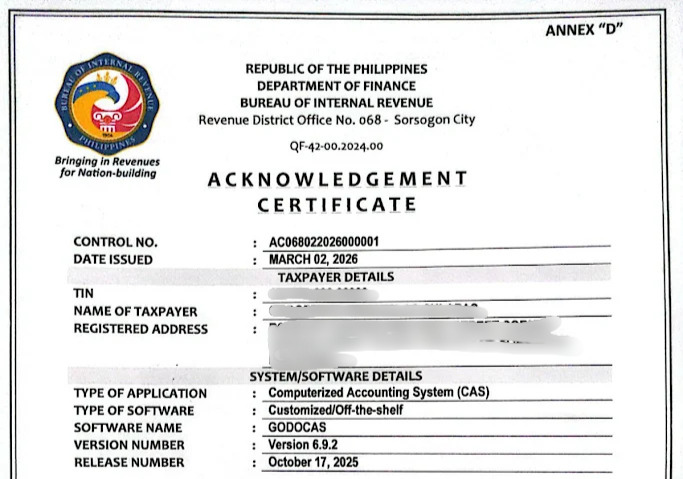
More of what Accounting does for you
Every feature below is in the product today.
Proposals and invoices
Prepare proposals, convert accepted proposals to invoices, then print, download or email invoices with payment links.
Bills, expenses and vendors
Record vendor bills, full or partial payments, categorized expenses and recurring expenses.
Banks and payment records
Track bank and cash accounts, record transfers and maintain supporting payment records.
Double-entry accounting
Use chart of accounts, journal entries, general ledger, trial balance, profit and loss and balance sheet reports.
Philippine tax summaries
Prepare VAT, percentage tax and withholding tax summaries and review filing calendar dates.
Access and audit controls
Use roles, permissions, activity history, two-factor login and separate company databases.
The full list
Sales and collections
- Proposals and proposal acceptance
- Convert proposals into invoices
- VATable, zero-rated and VAT-exempt sales
- Print, PDF and email invoices
- Partial payments and credit notes
- Online payment links through configured providers
Purchases and expenses
- Vendor bills and bill payments
- Expenses by category
- Recurring expenses
- Debit notes
- Customer and vendor CSV import/export
Books and reports
- Chart of accounts and journal entries
- General ledger and journals
- Cash receipts and disbursements books
- Trial balance, profit and loss and balance sheet
- Receivables, payables and cash flow
- PDF and CSV exports
Tax and controls
- VAT return summaries (2550Q)
- Percentage tax summaries (2551Q)
- Withholding tax summaries and 2307 data
- Filing calendar
- Period lock and activity history
- Role-based access controls
Up and running in a day
Set up your books
Configure the chart of accounts, bank accounts, customers and vendors. Import supported lists from CSV.
Record daily activity
Send invoices, enter bills and record receipts and payments as your business operates.
Review your reports
Use the ledger, financial statements and tax summaries to prepare for review and filing.
Made for Philippine service businesses
Agencies and studios
Bill projects and retainers, track what each client owes.
IT and tech services
Recurring services, hosting and support, invoiced on time.
Consultants and professionals
Clean books and tax summaries without an in-house accountant.
Growing service businesses
Start simple and add payroll and projects when you hire.
Accounting questions, answered
Is Godo double-entry accounting software?
Yes. The accounting module includes journal entries, a chart of accounts, a general ledger and standard financial statements.
Can customers pay invoices online?
Invoices can include payment links using supported and configured payment providers. Payments are recorded in your books.
Does Godo automatically file tax returns with the BIR?
No. Godo prepares accounting data and tax summaries. You or your accountant remain responsible for reviewing and submitting returns.
Is Godo BIR-accredited?
Do not treat GodoCAS registration or certificates as Godo accreditation. Confirm the applicable status and requirements with your accountant and the BIR.
Can my accountant access the books?
You can add users and assign roles and permissions appropriate to their work.
Try Accounting with your own numbers
Free for 7 days. No credit card needed.