Your books, payroll and projects in one place.
Godo brings clients, projects, accounting, HR and payroll into one connected platform, with Philippine tax and payroll built in.
One system for the whole business
Start with accounting. Add HR, payroll and projects when you are ready. Everything shares one set of books.
Books that stay in order from the first invoice
Send invoices your clients can pay online, and watch your ledger, reports and tax summaries update by themselves.
- Service invoices with GCash, Maya and card pay-now links
- Invoice formats based on the RMC 77-2024 samples
- VAT, percentage and withholding tax summaries
- Ledger, trial balance, profit and loss and balance sheet
Every employee record, complete and in one place
A full 201 file for each person, approvals that come to you, and a Home that tells HR what needs attention today.
- 201 profile with masked government IDs
- Leave, overtime and punch fixes in one approval list
- Contracts sent, read and accepted online
- Employee portal with email invites
Payroll in minutes, with every contribution computed
Attendance flows into payroll. SSS, PhilHealth, Pag-IBIG and withholding tax are computed from the current tables, ready for your review.
- Semi-monthly or monthly runs with approval
- Payslips by email and in the employee portal
- 13th month, final pay and year-end annualization
- SSS, PhilHealth, Pag-IBIG and withholding tax reports
Win the work, deliver it, bill it
Leads become clients, projects get done on a shared board, hours turn into invoices, and clients follow along in their own portal.
- Task board, milestones and time tracking
- Project invoices and expenses in your books
- Client portal with projects, invoices and tickets
- Leads and proposals in one pipeline
Your team, on their phones
Install Godo on any phone from the browser. Employees clock in, file leave and get their payslips; managers approve on the go.
- Clock in and out, with breaks
- Push notifications for approvals and payslips
- No app store needed: Android and iPhone
- Nothing personal stored on the phone
Get a plain-language answer without leaving your workspace
Ask Godo's AI assistant an accounting, payroll, HR or project question and get a clear answer. How-to questions are answered from the Godo User Guide, with a link to the article.
- Answers accounting, payroll, HR and project questions
- How-to answers come from the User Guide, with the article linked
- One chat button inside your workspace, no switching tabs
- Included in Business and Enterprise, with a fair-use daily limit
Answers are guidance. Check important figures with your accountant.
Your business has grown. Your tools shouldn't hold it back.
When client details live in one app, project costs in spreadsheets, invoices in another system, and employee records somewhere else, running your business becomes harder than it needs to be.
Godo brings your essential business workflows together, helping your team spend less time switching between tools and more time delivering great work.
Know your numbers
Keep income, expenses, invoices, and financial records organized.
Keep projects moving
Track tasks, deadlines, and the work your team needs to deliver.
Manage your people
Organize employee records and payroll workflows.
Stay connected to clients
Keep client information and project activity easier to manage.
Built for businesses that sell services, expertise, and time.
Godo is designed for Philippine service businesses that need better control over their clients, projects, people, and finances.
Digital and creative agencies
Manage client projects, deliverables, project expenses, invoices, and employee workloads.
IT and technology service providers
Organize client accounts, service work, projects, timesheets, and billing.
Consulting and professional services
Manage engagements, project budgets, client relationships, expenses, and financial records.
Web design and development companies
Connect client projects, task tracking, service invoicing, employee management, and accounting.
Other service businesses
Build a more organized operation for consulting, maintenance, and other service-based work.
Your business doesn't need to be large to need a better system.
The essential tools for running a service business.
One platform. Connected workflows. A clearer view of your operations.
Accounting and invoicing
Keep your financial records organized and manage the movement from proposal to invoice to payment.
- Proposals and invoices
- Online payments: GCash, Maya, cards
- Bills and expenses
- Credit and debit notes
- Bank transactions and transfers
- Financial statements and supported tax reports
HR and payroll
Organize your employee information and payroll processes in one place.
- Employee records and attendance
- Shifts, leave, and overtime
- Payroll and statutory contribution workflows
- Payslips and employee access
- 13th-month pay and payroll reporting
Projects and CRM
Manage client relationships and track the work your business delivers.
- Leads and customer groups
- Projects, tasks, and milestones
- Time tracking and timesheets
- Contracts and support tickets
- Client portal
Ask a question. Get a plain answer.
Ask AI sits inside your Godo workspace. Ask it the way you would ask a colleague, in English, Filipino or Taglish.
- Accounting and bookkeeping explained in plain words, with examples.
- Payroll, HR and projects: how things are usually done, and what to watch for.
- How to do it in Godo: answers from the User Guide, with a link to the full steps.
General guidance only. Ask AI can't see your company's data or change anything. Confirm tax and labor matters with your accountant. Included in Business and Enterprise.
Try it free for 7 days2. Click Void Invoice and enter the reason.
3. Confirm. From the guide: Void an invoice the right way
Philippine rules, built in. Deadlines, remembered for you.
Godo prepares the reports and reminds you before each deadline. You review, file and pay, the same way you do today, without the spreadsheets.
- VAT and percentage tax summaries
- 0619-E · 1601-EQ · 2307
- 1601-C · 1604-C · 2316
- Filing calendar reminders
- R-3 contributions
- R-5 payment summary
- Salary and calamity loans
- RF-1 premiums
- ER2 new hires
- Current premium tables
- MCRF contributions
- STLRF loan schedules
- Missing MID numbers flagged
- 13th month by Dec 24
- Final pay
- Holiday, overtime and night pay
More visibility. Less operational guesswork.
Designed for Philippine businesses
Workflows tailored to local business needs, including relevant Philippine accounting and payroll requirements.
A connected view of your business
Bring financial records, projects, clients, and employees into a more organized workflow.
Your own company workspace
Give each subscribed company its own workspace and data boundaries.
Accessible online
Work with your business system without managing your own application server.
A platform that can grow with you
Start with the tools you need and choose a plan that fits your team's requirements.
Built by a team with BIR-acknowledged experience
Godo Web Design has experience developing business accounting software, including GODOCAS, which is named on a BIR Acknowledgement Certificate issued on March 2, 2026. We bring that Philippine tax experience to Godo's VAT, percentage tax and withholding tax reports.
Godo is a separate product, and its own BIR registration status is described separately. Contact us for the current compliance status of the Godo functions you need.
Ask about compliance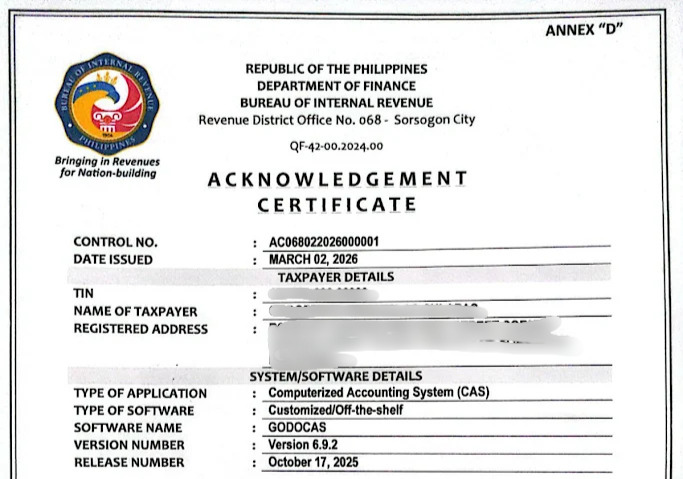
Get started in three steps.
Create your account
Tell us about your business and choose the right plan or trial.
Set up your workspace
Configure your company details and prepare the modules you need.
Start managing your business
Invite your team and begin organizing your clients, projects, accounting, and people.
Simple, honest pricing
Start with a free trial. Pick a plan when you are ready.
Starter
- Accounting and tax reports
- Invoices, bills and expenses
- Pay links and bank transfer payments
- Email support
- Daily backups
- Ask Godo help chat: how-to answers from the User Guide
Business
- Everything in Starter
- HR and payroll
- Projects and CRM
- Employee and client portals
- GCash, Maya and card payments, recorded automatically
- Ask AI assistant: accounting, payroll, HR and project questions
Enterprise
- Everything in Business, including Ask AI
- Setup and limits agreed with you
Prices in Philippine pesos. Pay by bank transfer. Ask AI has a fair-use daily limit per person.
Your business records deserve careful handling.
Your accounting records, employee information, and client details are important business assets.
Godo is designed to help you manage those records in an organized business workspace.
- Company-level access and permissions
- Separate customer data boundaries
- Backup and recovery procedures
- Secure account access
Who is Godo for?
Godo is designed for Philippine service businesses, including agencies, IT service providers, consultants, and other businesses that manage clients, projects, employees, and finances.
Do I need to install anything?
Godo is designed as an online platform. Check the supported browser and device requirements before getting started.
Can my clients pay invoices online?
Yes. Each invoice gets a secure pay link. Clients pay with GCash, Maya or card through your own PayMongo or Xendit account, or by bank transfer, and payments are recorded in your books automatically. Money goes straight to you; Godo never holds it.
Can I manage accounting and projects in one system?
Godo brings accounting, invoicing, projects, CRM, and other supported business functions into one platform.
Is Godo BIR-certified or acknowledged?
The BIR Acknowledgement Certificate shown on our website names GODOCAS, a separate product. It should not be read as certification or acknowledgement of Godo. Contact us for the current compliance status of the specific Godo functions you need.
Can I change plans later?
Plan changes depend on the subscription options made available in your account.
What happens after the free trial?
Your trial terms, available subscription plans, and any payment requirements are displayed during signup. A paid subscription does not begin without your consent.
What is Ask AI?
A chat button inside your Godo workspace. Ask an accounting, payroll, HR or project question and get a plain-language answer. For how-to questions it answers from the Godo User Guide and links the article.
Which plans include Ask AI?
Business and Enterprise include the AI assistant. Starter includes the Ask Godo help chat, which answers how-to questions from the User Guide.
Can the AI see my company's data?
No. It can't see your invoices, employees or payslips, and it can't change anything. Ask it how to do something, not what your balance is.
Can I rely on its answers for tax and labor?
Treat them as general guidance. Philippine tax and labor rules change, so confirm with your accountant, the BIR or the agency before you file, pay or decide.
Is my data used to train AI?
Your question is sent to our AI provider to write the answer. Under the provider's business terms it is not used to train their models. Godo hides email addresses and long numbers before sending.
Bring your service business together.
Spend less time juggling tools and more time delivering work your clients value. Manage your projects, people, clients, and finances with Godo.